Free Chrome extension

Look up any wallet. See what it holds, what it did, and what stands out.

Web3 Copilot is a free AI wallet analyzer for Chrome. Open a public blockchain address and see its portfolio, DeFi exposure, activity and risk signals in one panel — with a short AI summary.

  • No sign-up
  • No wallet connection
  • Read-only
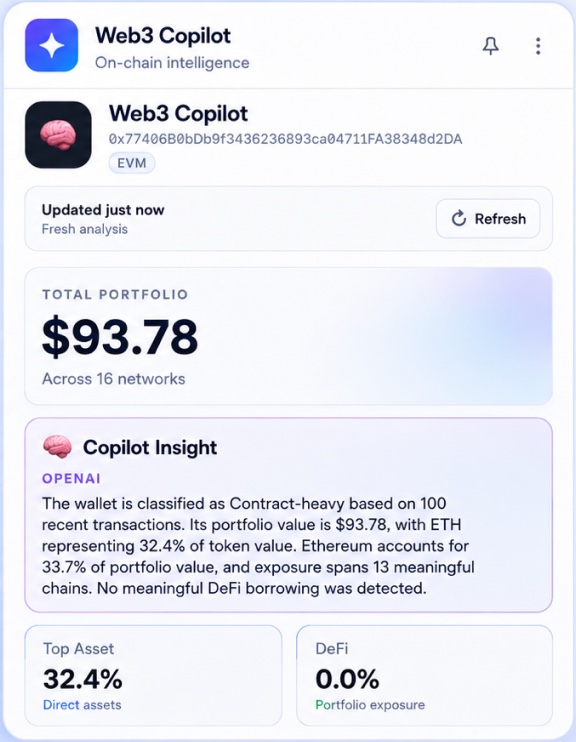
Web3 Copilot wallet report: total portfolio, Copilot Insight summary, top asset and DeFi exposure
Actual screenshot of the extension.
Supported networks
  • Ethereum & EVM networks
  • Solana
  • TRON
  • Bitcoin
  • TON
How it works

Three steps, without leaving the page.

Checking an address usually means copying it between several explorers and dashboards. Web3 Copilot keeps the answer next to the page you are already reading.

  1. Step 1

    Find an address

    Browse an explorer or Web3 site as usual. Web3 Copilot lists the addresses it detects on the page, or you can paste one.

  2. Step 2

    Open the report

    It checks whether the address is a wallet or a contract, then shows portfolio, DeFi, risk and activity data.

  3. Step 3

    Read the summary

    Copilot Insight explains the report in plain language. Save the wallet to your watchlist or compare it with another.

Inside the extension

What you actually get.

Every image below is a real screenshot of Web3 Copilot, the same ones shown on its Chrome Web Store page.

Wallet report

The whole wallet in one panel.

Total portfolio across networks, the share of the largest asset and DeFi exposure — with a short Copilot Insight that explains the numbers in plain language.

  • Total portfolio across networks
  • AI-written Copilot Insight
  • Top asset and DeFi exposure
Web3 Copilot wallet report showing total portfolio, Copilot Insight summary, top asset share and DeFi exposure
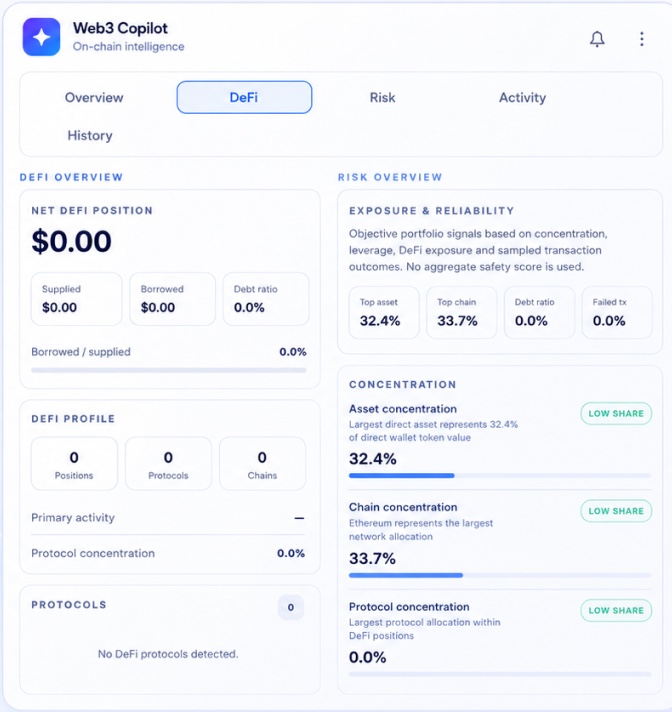
DeFi & risk signals

Signals you can check, not a black-box score.

Net DeFi position, supplied and borrowed value, debt ratio, and concentration signals for assets, chains and protocols. Each signal shows the number behind it — there is no aggregate safety score.

  • Supplied, borrowed and debt ratio
  • Asset, chain and protocol concentration
  • Failed-transaction share
Web3 Copilot DeFi overview and risk overview with concentration signals
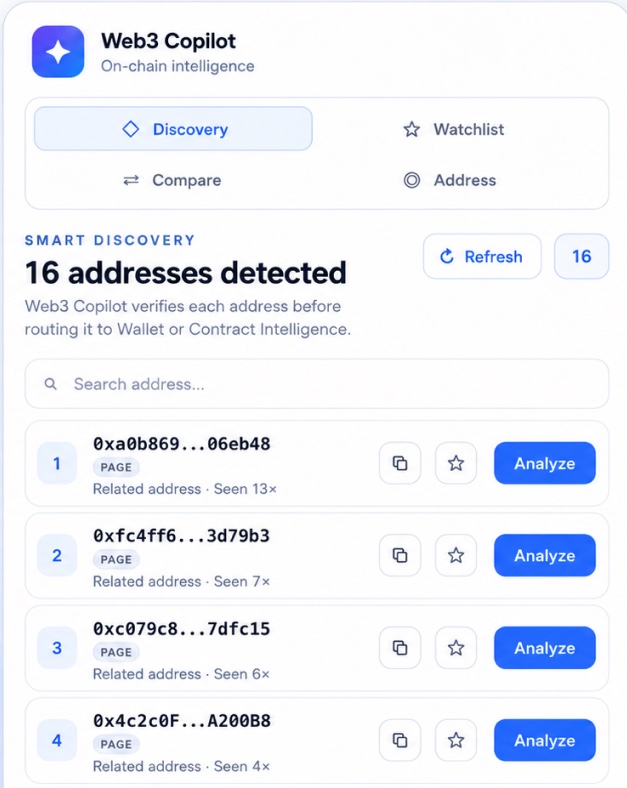
Address discovery

Finds the addresses on the page for you.

While you browse an explorer or a Web3 site, Web3 Copilot lists the addresses it detects, checks whether each is a wallet or a contract, and opens the right report in one click.

  • Automatic address detection
  • Wallet or contract check
  • One-click analysis
Web3 Copilot Smart Discovery listing 16 addresses detected on the current page
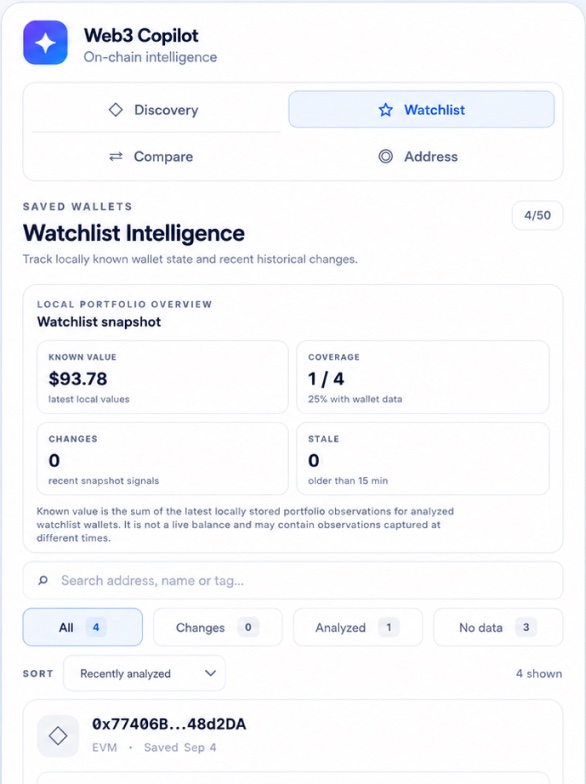
Watchlist

Keep an eye on saved wallets.

Save up to 50 wallets and review the latest locally stored snapshot for each — what changed, what is stale, and what has no data yet.

  • Saved wallets
  • Local snapshots
  • Filter by changes or status
Web3 Copilot Watchlist with saved wallets and a local portfolio snapshot
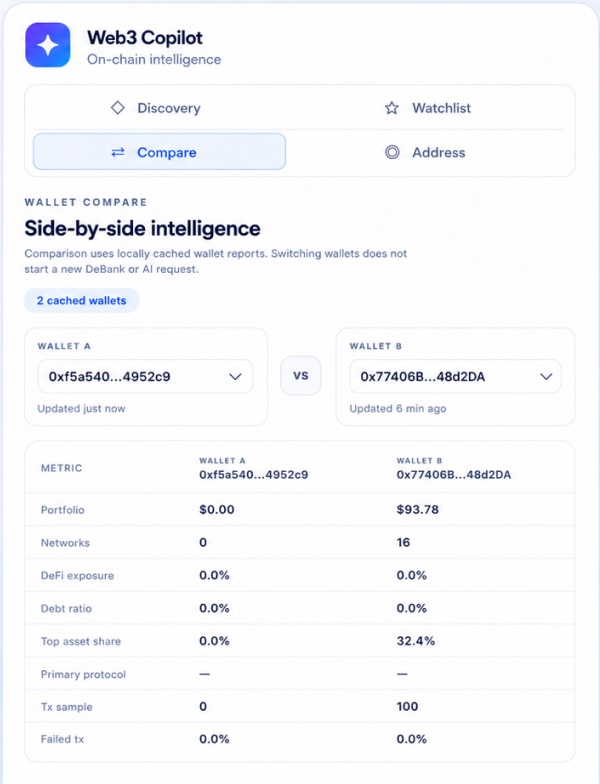
Compare

Two wallets, side by side.

Pick two analyzed wallets and compare portfolio, networks, DeFi exposure, debt ratio, top asset share and transaction metrics in one table.

  • Side-by-side metrics
  • Uses saved reports
  • No extra request needed
Web3 Copilot wallet comparison table for two wallets
Safety

Read-only, by design.

Web3 Copilot only reads public blockchain data. It is not a wallet, an exchange or an investment service.

Never asks for keys

No seed phrase, private key or wallet signature — ever.

Never holds funds

It cannot move assets or sign transactions.

No buying or selling

You cannot buy, sell or exchange crypto assets through it.

No financial advice

Reports describe public data. They are not investment, tax or legal advice.

Who makes it

Built so that checking one address doesn't take five tabs. It shows the data and leaves the decision to you.

Vladislav NitsenkoDeveloper of Web3 Copilot

Web3 Copilot is an independent product, developed and operated by Vladislav Nitsenko in Estonia. It is distributed through the Chrome Web Store and is free to use.

Questions, bug reports and privacy requests go straight to the developer. Contact details.

Price
Free
Platform
Google Chrome
Based in
Tallinn, Estonia
FAQ

Common questions.

Is Web3 Copilot free?

Yes. The extension is free to install and use. There is no subscription, paid tier or premium upgrade.

Do I need to connect my wallet?

No. Web3 Copilot only reads public blockchain data for the address you look at. It never asks you to connect a wallet, sign anything or share a seed phrase or private key.

Which networks are supported?

Ethereum & EVM networks, Solana, TRON, Bitcoin, TON. Coverage can differ between networks; the report shows what data is available for each address.

Can it tell me whether to buy or sell something?

No. Web3 Copilot is a research tool. It shows public data and explains it, but it does not give investment, financial, tax or legal advice.

What data does the extension collect?

It reads supported pages to recognize addresses and processes the addresses and reports you open. Watchlist and comparison data are stored locally in your browser. It does not sell personal data. Details are in the Privacy Policy.

Look up your first wallet.

Free · Google Chrome · No sign-up · No wallet connection

Add to Chrome — it's free